Peak season has a very specific sound: checkout notifications, warehouse scanners, carrier pickups, and a support inbox that won’t stop lighting up. Carts are full, and your team is moving fast, yet customers feel anything but calm because shipping networks are strained at the exact moment expectations rise. Even brands with strong products and loyal buyers can get buried under the same repeating message: “Where is my order?”
Those order status requests look small one at a time, but they steal hours from your team during the busiest weeks of the year. Agents end up pasting tracking links instead of solving real issues, ops gets interrupted to investigate packages that are still on schedule, and response times slip for customers who truly need help. The financial impact sneaks in, too, since slow replies can lead to more refund requests, higher chargebacks, and lower reviews.
“The post-purchase experience deserves a seat at the executive table because it affects both brand equity and margin. A better return process can reduce service volume while increasing customer confidence. Clearer shipping communication can lower inbound tickets while improving trust. Faster resolution can protect repeat purchases. Cleaner workflows can reduce stress on teams and make the business easier to scale.” Read Article on Forbes

| Category | Product | Best For | Key Features |
|---|---|---|---|
| CRM | ReadyCloud CRM | Teams needing complete customer visibility | Unified customer profiles, activity timelines, multichannel data synchronization |
| Shipping | ReadyShipper X | High-volume fulfillment across multiple carriers | Batch label printing, real-time rate comparison, automation rules |
| Returns | ReadyReturns | Enterprise-grade return automation | Branded return portals, RMA workflows, analytics, exchange options |
| Task Management | ReadyCloud Tasks | Cross-team ecommerce and operations workflows | Project tracking, task assignments, accountability and visibility |
| App Integration | ReadyCloud App Store | Connecting platforms, marketplaces, and carriers | Shopify, BigCommerce, WooCommerce, Amazon, eBay, and more |
This playbook maps a practical “reduce tickets” workflow using ReadyCloud’s suite, so customers get answers before they feel the need to ask. ReadyShipper X strengthens shipping execution so tracking is clean and accurate, Action Alerts sends timed updates based on real order events, and ReadyReturns creates a self-service returns experience that prevents a second surge of “where is it” messages after delivery. You’ll walk away with a peak-season-ready checklist, messaging milestones, and implementation tips that don’t require rebuilding your whole tech stack.
What WISMO Means And Why It Explodes During Peak Season
WISMO stands for “Where Is My Order,” and it’s a category of support requests for order status uncertainty. It isn’t a single question so much as a pattern: customers can’t confidently tell what’s happening, so they contact you to confirm the next step. In peak season, that pattern spikes because carriers are overloaded, warehouses are pushing volume, and even small delays feel bigger to shoppers buying gifts.
Customers don’t usually type your internal terms into Google or your help center. They search and message in plain language, such as “order tracking,” “delivery status,” “shipping update,” “still not delivered,” or “tracking hasn’t moved.” That intent is urgent, and it tends to arrive in waves after major shopping days or promo events.
| Trigger | Why It Generates Customer Support Tickets |
|---|---|
| Carrier Backlogs | Packages are picked up but sit in transit hubs longer than expected, making customers believe orders were not shipped. |
| Missed Tracking Scans | Tracking appears frozen when a scan is skipped, prompting customers to ask for order status updates. |
| Split Shipments | Multiple packages arrive separately while customers expect one delivery, causing confusion and inquiries. |
| Address Issues | Invalid or incomplete addresses create carrier holds or returns to sender, triggering customer concern. |
| Label Errors and Mis-picks | Incorrect items or routing mistakes lead to misdirected shipments and service complaints. |
| Warehouse Bottlenecks | Orders sit packed but not handed off to carriers, creating delays between confirmation and movement. |
| Weather Disruptions | Regional storms delay transportation networks and extend delivery times without clear explanations. |
| Unclear Tracking Pages | Vague or generic tracking messages fail to explain normal shipping stages, leading customers to contact support. |
There’s also a hidden cause most brands miss: silence between milestones creates uncertainty, and uncertainty becomes a support ticket. If a customer gets an order confirmation and then hears nothing for days, their brain fills the gap with worst-case assumptions. That’s why ticket volume jumps, CSAT drops, response times slow, and refund pressure rises during the exact weeks you can least afford it.
“Growing e-commerce brands have set a new standard. They’re demonstrating that, with the right strategy in place, the post-purchase experience can be elevated. And customers are noticing it. For the larger retailers in the pond, this represents a monumental shift that swings from traditional customer acquisition to long-term retention.” Read Article on Forbes
What “Where Is My Order” Really Means To Customers
Customers aren’t asking for tracking data as much as they’re asking for reassurance and a clear next step. They want to know whether their purchase is safe, whether it will arrive in time, and what to do if something looks off. If you answer those three needs, the actual tracking link becomes a supporting detail, not the entire response.
Most “where is it” messages fit into three scenarios, and each needs a different kind of clarity.
Pre-shipment is the first scenario, where the order is confirmed, but there’s no visible movement. The customer sees a confirmation email, then nothing else, and starts to worry that you haven’t processed the order. During peak season, even a normal 24 to 48-hour processing window can feel like a red flag if it isn’t explained upfront.
In-transit is the second scenario, where tracking exists but updates aren’t useful. Carrier jargon like “in transit” or “departed facility” doesn’t answer the real question of “Will it arrive by the date I’m counting on?” Missed scans make it worse because a package might be moving, but the customer can’t see proof.
“Delivered” is the third scenario, and it’s the highest emotional moment. A customer sees a delivered scan but can’t find the package, or it was delivered to the wrong location, or it was stolen. In that moment, a generic tracking link feels dismissive, while a clear checklist and an easy escalation path feel supportive.
Self-service fails when it’s done poorly without the right shipping and receiving solution in place. Weak tracking pages, confusing status language, and missing context like expected delivery windows push customers back to your inbox. The best brands reduce inbound messages by pairing proactive updates with simple actions, short explanations, and language that sounds human instead of scripted.
“Cloud-based solutions are tethered to the uptime of the service provider, whereas hybrid-cloud solutions mean you can keep shipping packages even if your SaaS provider is experiencing a disruption of service.” – Read Article on Forbes
The Peak-Season Ticket Loop And Where It Breaks
The typical loop is painfully familiar. A customer places an order, shipping takes longer than expected, tracking updates lag, and the customer contacts support. Support replies with a tracking link, but the customer still feels uncertain, then they contact again, sometimes multiple times. Each loop eats more time, and your team starts to feel like they’re running in circles.
The key is spotting the breakpoints where automation and better execution change the outcome. Those breakpoints are predictable, and you can design your workflow around them.
Here are the moments that matter most:
- The moment a label is created.
- The first carrier scan.
- Exceptions and delays.
- Out-for-delivery.
- Delivered confirmation.
- Returns initiated and returns received.
A “one team, many tools” setup makes this harder than it needs to be. If shipping, support, and marketing are disconnected, customers get inconsistent answers. An agent says one thing, the tracking page says another, and a marketing email arrives that ignores the delay entirely. Even if each team is doing its best, the customer experiences it as chaos.
ReadyCloud’s suite is compelling in peak season because it supports a single workflow across execution, communication, and post-delivery resolution. ReadyShipper X helps ensure the fulfillment reality is accurate and scalable. Action Alerts communicates that reality in real time using timed updates tied to actual order events. ReadyReturns manages the after-delivery loop, so returns don’t create a second support surge.

How ReadyShipper X Reduces Shipping Errors That Create Order Status Questions
Fewer shipping mistakes equals fewer anxious customers and fewer tickets. That sounds obvious, yet peak season is exactly when small errors multiply. A wrong label, a mismatched address, or a missed pick might be rare in October, then suddenly show up daily once order volume spikes. Each mistake creates downstream noise: delayed delivery, confusing tracking, extra contacts, and manual investigations.
ReadyShipper X focuses on shipping execution at scale, which is where many “status” problems are born. If orders move out the door cleanly, tracking tends to be cleaner, and your team can spend more time on true exceptions instead of preventable issues.
I am raw html block.
Click edit button to change this html
| ReadyShipper X Capability | Operational Benefit and Ticket Reduction Impact |
|---|---|
| Multi-Carrier Rate Shopping | Allows teams to choose faster or more reliable services during peak periods, reducing delays that trigger order status inquiries. |
| Batch Processing and Fast Label Creation | Keeps fulfillment moving during order spikes so packages are shipped on time instead of sitting in a queue. |
| Address Validation | Catches incomplete or incorrect addresses before shipment, preventing carrier holds and return-to-sender situations. |
| Scan-to-Ship Workflows | Verifies items and labels at packing stations, reducing mispicks, wrong items, and routing errors. |
| Accurate Label Generation | Improves routing accuracy and lowers the likelihood of misdirected packages or delivery failures. |
| Fast Tracking Synchronization | Updates tracking information in the storefront quickly so customers see shipment movement without contacting support. |
Peak season success often comes down to standardized shipping logic with a strong focus on Shipping Intelligence. You don’t want fulfillment decisions changing order to order based on who packed it, which carrier is top of mind, or which spreadsheet is open. Consistency reduces edge cases, and it’s where support teams get buried.
“In a perfect world, you’d have the solution you needed in just a few clicks. In reality, not all software accommodates the specific needs of the individual retailer. When creating a balanced shipping strategy for your online business, it’s imperative that you ensure the feature sets you need are in place, so you can fulfill faster and go home early.” – Read Article on Forbes
| Preparation Step | Why It Matters Before Order Volume Spikes |
|---|---|
| Verify Carrier Accounts | Ensure all carrier accounts, service levels, and backup shipping options are active so you can reroute shipments if delays occur. |
| Map Shipping Methods to Service Levels | Align storefront promises like “2-day” or “standard” with actual carrier services to prevent delivery expectation issues. |
| Establish Cutoff Rules and Warehouse Waves | Create predictable fulfillment batches so orders move steadily through packing and carrier handoff. |
| Assign Exception Ownership | Designate responsibility for carrier holds, address issues, and shipping errors to avoid unresolved delays. |
| Test Tracking Sync End-to-End | Confirm tracking updates flow from label creation to storefront and customer notifications without manual intervention. |
Shipping execution may feel like an ops-only concern, yet it’s also customer experience and brand perception. Clean fulfillment makes your post-purchase communication more believable, because customers can see proof in the tracking timeline. That’s the foundation that makes proactive messaging work.
“Post-purchase is a crucial part of the customer journey, but it often doesn’t get the attention it deserves, especially at the enterprise level. What’s interesting is how many growing e-commerce brands are outshining larger retailers when it comes to what happens after the “buy” button is clicked.” – Read Article on Forbes

How Action Alerts Prevent Tickets With Proactive Order Updates That Feel Personal
Customers ask fewer questions when they receive clear, timely updates tied to real order events. The difference between “marketing blasts” and post-purchase messaging is intent. Marketing tries to drive another purchase, while post-purchase messages reduce uncertainty, set expectations, and guide action. During peak season, those messages can be the difference between a calm customer and a frustrated one.
Action Alerts is designed to trigger updates based on order status milestones, which keeps communication aligned with what’s actually happening. Instead of your team reacting one ticket at a time, you’re answering the most common questions before they reach your inbox.
| Milestone | Purpose and Customer Impact |
|---|---|
| Order Confirmation | Sets expectations with processing timelines, delivery windows, and a self-service tracking link. |
| Label Created | Explains what happens next in plain language so customers understand the package may not move immediately. |
| First Carrier Scan | Confirms the shipment is in transit and shows real movement, reducing order status inquiries. |
| Delay or Exception Update | Reassures customers during disruptions while clearly outlining next steps and revised expectations. |
| Out-for-Delivery Notification | Provides a delivery heads-up that prevents “will it arrive today” support messages. |
| Delivered Confirmation | Confirms arrival and includes instructions in case the package cannot be located. |
| Post-Delivery Check-In | Routes problems to support early and prevents negative reviews or public complaints. |
Personalization matters, and it doesn’t need to be complicated. Include the customer’s name, order number, item count, shipping method, and an estimated delivery range if available. Clear policy reminders help too, especially around processing times, weekend carrier movement, and how split shipments work. The goal is to remove ambiguity, not to add more text.
Peak-season messaging needs guardrails so it stays helpful, not annoying:
- Set frequency caps so customers don’t get flooded if multiple scans happen fast.
- Respect quiet hours, especially for SMS.
- Segment high-value customers for more proactive updates and faster escalation options.
- Include clear opt-out language so your brand stays compliant and respectful.
You’ll also want a clean support handoff plan. Route replies to the right team, tag common issues, and use templates that maintain a consistent tone across agents. A short, calm message that explains what’s normal can prevent a second follow-up ticket, which is where the real time savings show up.

“Many retailers are simply not equipped to manage what’s coming. But some are. These are the brands already investing in technology, training and process optimization to turn what used to be a logistical nightmare into a competitive edge.” – Read Article on Forbes
How ReadyReturns Stops The Second Wave Of “Where Is It” After Delivery
The first wave of “where is it” happens before delivery. The second wave often hits after delivery, once returns and exchanges start. If your returns process is unclear, customers ask the same kind of questions again: “Did you get my return?” “When will my refund be processed?” “Where do I find the label?” “Can I exchange instead?”
ReadyReturns helps prevent that second surge by turning returns into a guided, self-service experience. The customer experience goals are simple: easy initiation, clear instructions, visible progress, and fast resolution. If you deliver those, your inbox gets quieter, and your customers stay more confident, even if the original purchase didn’t go perfectly.
| Operational Improvement | Why It Matters During Peak Season |
|---|---|
| Self-Service Returns Portal | Keeps customers from emailing support by letting them initiate returns independently. |
| Automated Return Label Creation | Provides instant labels so customers do not have to wait for an agent to respond. |
| Clear Eligibility Rules | Reduces back-and-forth conversations about policy exceptions and speeds approvals. |
| Return Consolidation Options | Lowers shipping costs and simplifies handling when customers send back multiple items. |
| Exchange, Credit, or Refund Routing | Directs returns toward exchanges or store credit when appropriate, supporting peak-season revenue strategy. |
Return status visibility is the missing piece for many brands. Customers want milestones that mirror shipping updates: return started, label created, drop-off confirmed, return received, refund or credit issued. If those milestones are visible, “did you get it?” messages drop sharply, and agents can focus on real problems, like damaged items or missing contents.
Returns connect directly to retention. A clean return experience can preserve the relationship, protect reviews, and increase the chance the customer buys again. That’s not just ops hygiene, it’s brand trust and long-term revenue.
Putting It Together: A Peak-Season Ticket Reduction Blueprint Using The ReadyCloud Suite
This is easier to manage if you think in terms of systems rather than isolated tools. ReadyShipper X controls the fulfillment reality. Action Alerts communicates that reality in real time. ReadyReturns manages the after-delivery loop, so returns don’t restart the anxiety cycle. The result is one connected journey, from checkout to delivery to resolution.
A practical implementation approach can fit into four weeks without a massive rebuild:
- Week 1: Clean up shipping workflows and confirm the accuracy of the tracking sync.
- Week 2: Build message milestones, templates, triggers, and escalation paths.
- Week 3: Align returns policies, configure rules, and launch the portal experience.
- Week 4: Stress test, run exception drills, and set peak staffing rules and ownership.
Track success with metrics that are easy to measure and hard to argue with. Focus on ticket volume per 100 orders, first-response time, repeat-contact rate, delivery-exception rate, refund rate, and CSAT. Add a weekly review cadence during peak season to spot trends early and adjust messaging or workflows before tickets spike.
Team alignment closes the loop. Ops owns carrier performance and warehouse flow, support owns tone and escalation, and marketing owns consistency across post-purchase messaging, ultimately enhancing the post-purchase experience. One shared playbook beats three separate interpretations of what the customer should be told.
Messaging And Process Checklist For Peak Season
This section is meant to be screenshot-friendly and shareable internally. If your team can check these items off before order volume surges, you’ll prevent a lot of inbox chaos later.
- Confirm carriers, service levels, and cutoff times for each shipping method.
- Validate label accuracy and address checks to reduce misroutes and holds.
- Turn on key status triggers and verify every tracking and portal link works.
- Write exception messaging that tells customers what to do next, not just what happened.
- Set return rules and timelines that align with peak capacity and staffing levels.
- Create internal playbooks for “delivered but not received” and “no scan yet” cases.
- Monitor daily: exceptions, backlog, and ticket trends to act fast.
Build a simple runbook for the most common edge cases. For “no scan yet,” your message should explain processing time, what the first scan means, and the point at which your team will proactively investigate. For “delivered but not received,” include a short checklist like checking around the property, confirming the address, and waiting a short window for carrier mis-scans, plus a clear escalation path if the package still isn’t found.
The goal isn’t perfection. The goal is fewer surprises, faster clarity, and less manual investigation triggered by uncertainty.
Eliminate WISMO with ReadyCloud!
Get ahead of peak-season WISMO before it hits your inbox. See how ReadyCloud connects ReadyShipper X, Action Alerts, and ReadyReturns to reduce order status tickets and improve fulfillment with proactive updates. Request a ReadyCloud demo and map your peak-season playbook in under 30 minutes.
The Future of Ecommerce is Now
Staying ahead in the ecommerce industry means embracing innovation and anticipating changes before they arrive. The ecommerce trends shaping 2025 provide valuable insights into what’s next, but the future also brings exciting new possibilities. Businesses that adapt quickly and leverage the right tools will thrive in this dynamic landscape.
Ready for 2026? ReadyCloud Has You Covered!
Success in 2026 starts with the right tools, and ReadyCloud’s suite of solutions is designed to propel your ecommerce business to new heights. With ReadyCloud, you’ll have all your data centralized in one place, offering insights that drive smarter decisions. Take your marketing to the next level with Action Alerts, delivering growth-focused, automated campaigns that keep your customers engaged.
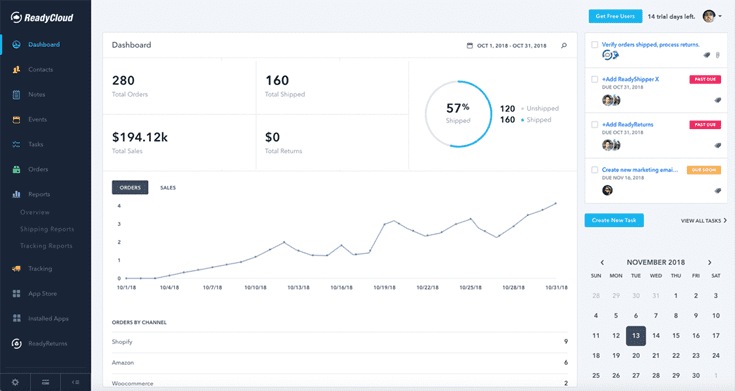
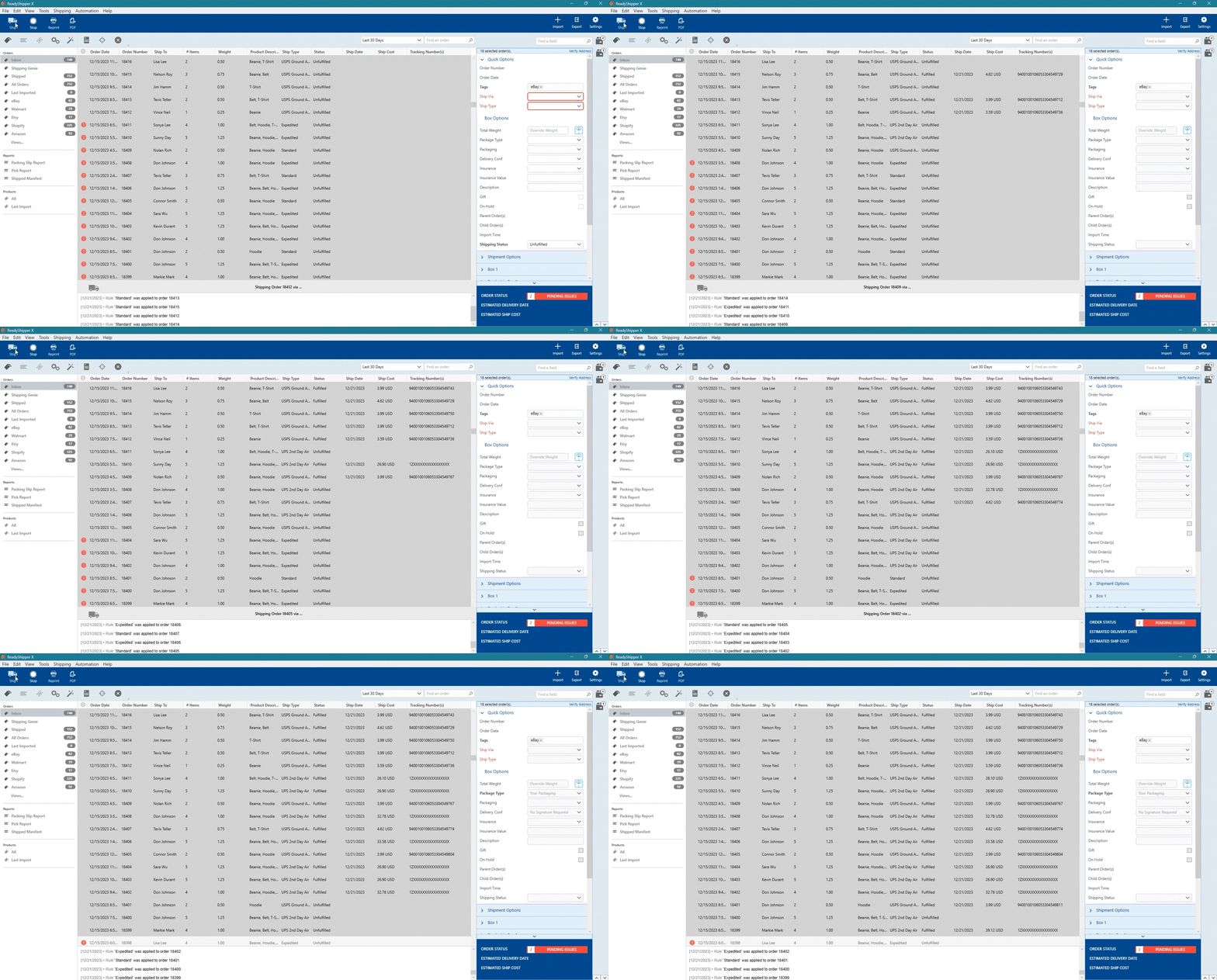
Shipping is easier than ever with ReadyShipper X, a multicarrier solution that simplifies your fulfillment process while saving time and money.
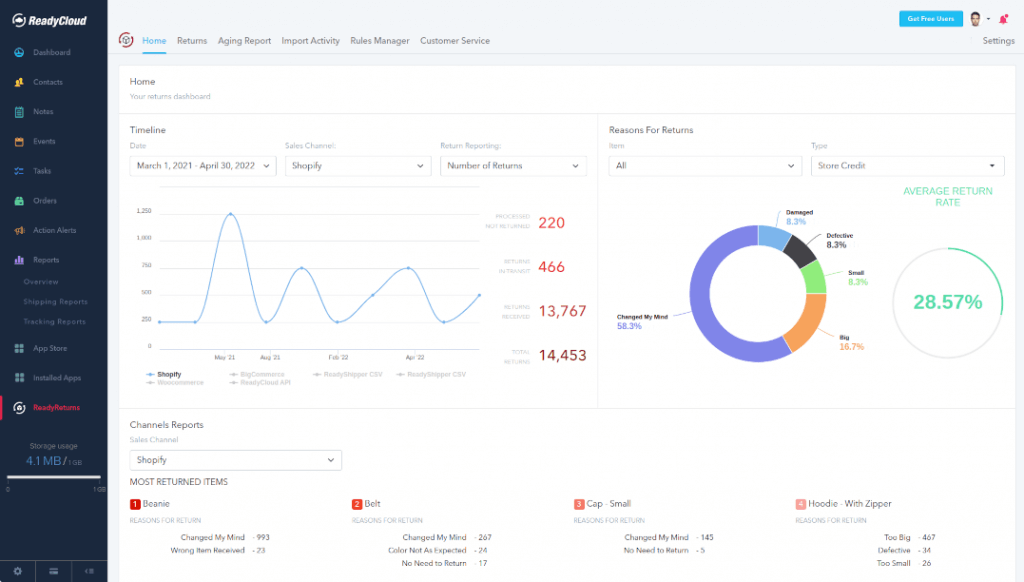
And when it comes to returns, ReadyReturns streamlines the entire process with an automated solution that boosts customer satisfaction and loyalty.
ReadyCloud is more than just a suite of systems—it’s your ticket to thriving in 2026 and beyond!
Start your journey to success today! Learn more and get started here.
Or contact our Sales Department at: 877-818-7447 ext. 1.
Frequently Asked Questions About Peak-Season WISMO Playbook
What Is WISMO?
It’s an acronym for “Where Is My Order,” and it describes a large category of customer messages tied to shipping and delivery uncertainty. These tickets usually spike during high-volume periods because carrier networks slow down, and tracking updates can lag. The best way to reduce them is to set expectations early, keep tracking accurately, and send proactive status messages tied to real events.
What Is “Where Is My Order”?
It’s not one single question. It’s a bundle of customer intent that can show up as “tracking hasn’t moved,” “is it shipped,” “will it arrive on time,” or “it says delivered, but I don’t see it.” Customers ask for it at predictable moments, such as pre-shipment, in-transit gaps, and delivery confusion. Clear milestones and next-step guidance reduce repeat contacts.
How Do I Reduce WISMO Tickets During Peak Season?
Focus on three levers: fewer fulfillment errors, more proactive messaging, and stronger self-service for shipping and returns. Shipping accuracy reduces misroutes and incorrect deliveries, which lead to high-effort investigations. Proactive alerts reduce “no news” anxiety and stop customers from guessing. A returns portal with clear milestones prevents a second wave of status requests after delivery.
What Order Status Updates Should I Send To Customers?
Send updates that match the moments customers worry most: order confirmation, label created, first scan, in-transit progress, delay or exception, out-for-delivery, delivered, and a post-delivery check-in. Each milestone prevents a specific kind of inbound question, especially during scan gaps and carrier slowdowns. Keep messages short, specific, and action-oriented with links to self-service tracking.
Does SMS Really Reduce Customer Support Requests?
Yes, because SMS tends to be seen faster than email during busy weeks, and speed matters when customers are anxious. Triggered texts tied to meaningful milestones like first scan, out-for-delivery, and delivered can prevent a lot of “any update” messages. Frequency caps and quiet hours keep the channel respectful. Pair SMS with a self-service link so customers can check details without contacting support.
What Should I Do When Tracking Has Not Updated In Days?
Start with expectations and clarity. Explain that carrier scans can be delayed during peak volume, and that a lack of updates doesn’t always mean a package is stuck. Give a specific next step, such as waiting for the next hub scan within a defined window, and promise a proactive check if it doesn’t appear. Offer an escalation path so customers know you’ll take action without having to repeat follow-ups.
How Can Shipping Software Help Prevent Delivery Problems?
Shipping software can reduce internal errors that lead to delivery problems, such as incorrect labels, address errors, and mismatched service levels. Batch workflows help fulfillment keep pace without rushing decisions. Scan-to-ship checks reduce mispicks and wrong-box issues that lead to “delivered but incorrect” complaints. Cleaner execution also yields cleaner tracking data, reducing confusion and ticket volume.
How Do Returns Create More Order Status Questions?
Returns create a “status gap” if customers can’t see progress after they drop off the package. That gap leads to messages like “Did you receive it?” and “When is my refund?” especially if processing is slower during peak season. A self-service portal with return milestones reduces uncertainty and keeps customers informed. Clear rules for exchanges, credits, and refunds also cut back-and-forth emails.
What Should My Team Track To Prove We Reduced Order Status Questions?
Track ticket volume per 100 orders, repeat contact rate, first response time, and the share of tickets tied to shipping or returns status. Add delivery exception rate and refund rate to connect support volume to operational performance. A weekly dashboard during peak season is enough to spot trends early. If your proactive messages are working, you should see fewer “status-only” tickets and fewer repeat follow-ups.