
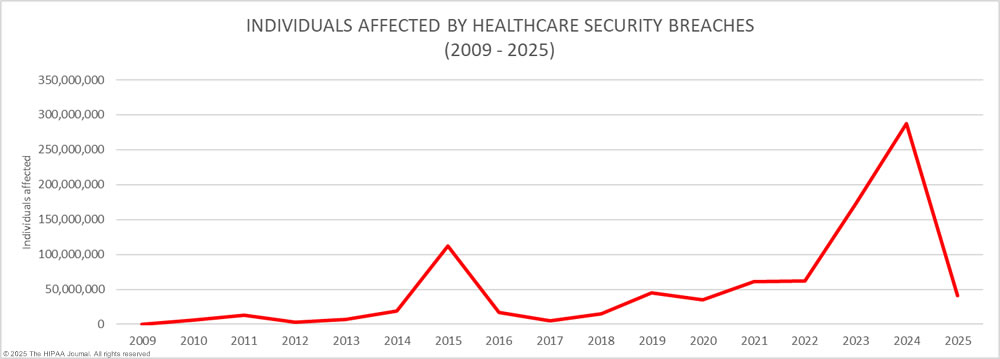
Healthcare has become one of the most targeted industries for cybercriminals, and the numbers aren’t showing signs of slowing down. According to recent healthcare data breach statistics, the sector has consistently experienced year-over-year increases in both the number and severity of data breaches. This isn’t just an IT issue. It’s a threat to patient safety, institutional trust, and compliance integrity.
Behind the headlines and breach reports, one culprit often flies under the radar: end-user devices. These include laptops, desktops, smartphones, towers and tablets used by employees across hospitals, clinics, and remote care environments. When these devices go unaccounted for during employee offboarding, they become silent threats with the potential to expose vast amounts of protected health information (PHI).
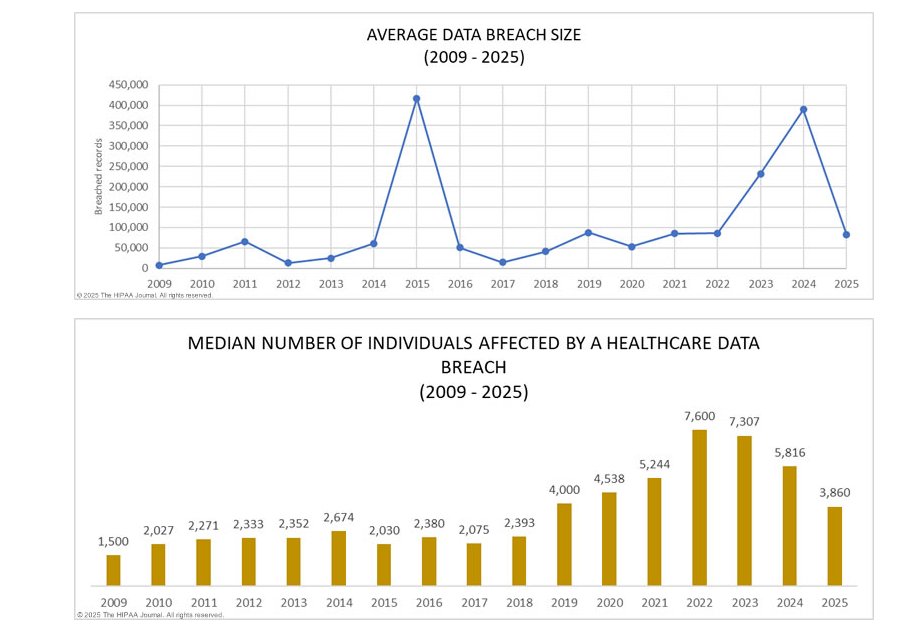
What’s more, the ongoing shift toward remote work and hybrid care models has only increased the number of endpoints in circulation. Without a consistent process for recovering these assets when employees leave, healthcare providers are taking on unnecessary risk that is both preventable and costly.

| Features & Benefits | FedEx Asset Return Program | ReadyCloud Asset Return |
| Ease of Use | ❎ Moderate: Requires packaging & manual label creation. | ✅ High: Automated workflows, intuitive platform. |
| Employee Convenience | ✅ Good: Accessible FedEx drop-off points. | ✅ Excellent: Simple, automated return process. |
| Real-time Asset Tracking | ❎ Limited: Basic tracking with delays possible. | ✅ Advanced: Instant visibility & notifications. |
| Integration with Existing Systems | ❎ Minimal: Limited integration options. | ✅ Comprehensive: Full integration capabilities. |
| Cost Transparency | ❎ Moderate: Hidden costs, variable fees. | ✅ High: Predictable, transparent pricing. |
| Scalability | ❎Limited: Complex management at high volumes. | ✅ Excellent: Easily scalable, regardless of size. |
| Employee Offboarding Support | ❎Basic: Manual follow-up required. | ✅ Robust: Automated alerts, simplified retrieval. |
| QR Code Support | ✅ Available (via third-party at extra cost). | ✅Included: Fully integrated at no extra fee. |
| Workflow Automation | ️❎ Minimal: Mostly manual processes. | ✅ High: Automated, customizable workflows. |
| Hidden Costs and Fees | ✅ Yes: Packaging, labels, QR subscription fees. | ✅ None: Transparent costs, no hidden fees. |
| Customer Support | ✅ Standard support available. | ✅ Exceptional: Dedicated onboarding & assistance. |
✅ Overall Winner: Clearly, ReadyCloud Asset Return offers unmatched benefits, making it the obvious choice for businesses serious about simplifying and optimizing asset returns.
Understanding the Modern Healthcare Breach Landscape
The Health Insurance Portability and Accountability Act (HIPAA) was enacted to protect patient data, but the complexity of modern healthcare networks has made total compliance harder than ever. The value of PHI on the black market often exceeds that of financial data, making healthcare organizations prime targets for threat actors.
Table 5 of a comprehensive study published in The National Library of Medicine breaks down the types of breaches impacting the industry. Hacking incidents top the list, followed by theft, loss, and unauthorized access or disclosure. While network vulnerabilities and software flaws are often addressed through layered cybersecurity solutions, breaches that stem from human error or poor device management remain a significant blind spot.
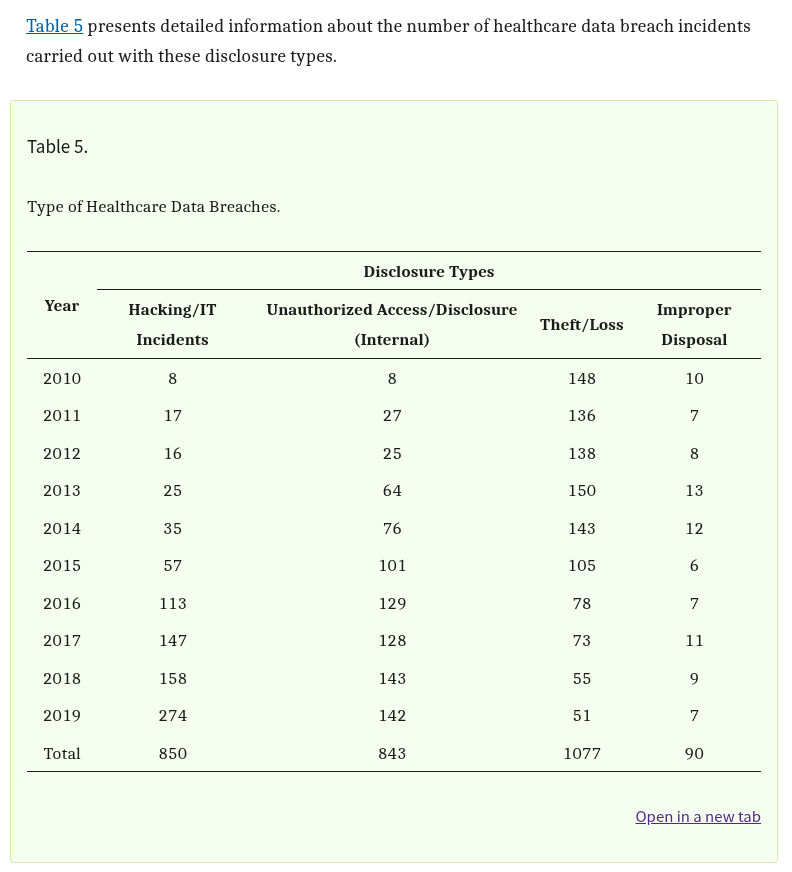
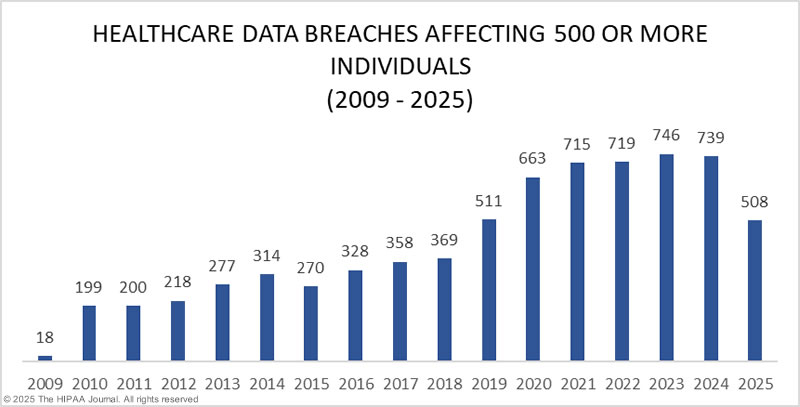
Statistics on healthcare breaches show that the volume of incidents is increasing each year. Breaches are becoming more sophisticated, but at the same time, many still originate from simple lapses in operational controls. Among those lapses is the failure to secure end-user devices during transitions in employment.
Organizations focused solely on network security may be overlooking a crucial vulnerability. Desktops and laptops are commonly involved in breaches, not because they are inherently insecure, but because they are frequently misplaced, stolen, or inadequately wiped before being reassigned or forgotten altogether.
Where the Breaches Are Happening: The Role of End-User Devices
Looking at Table 6 from the same study, it’s clear that a large percentage of healthcare data breaches are linked to specific locations such as end-user devices. Laptops, desktops, and portable electronic devices rank high on the list of breach origins, alongside email and servers.
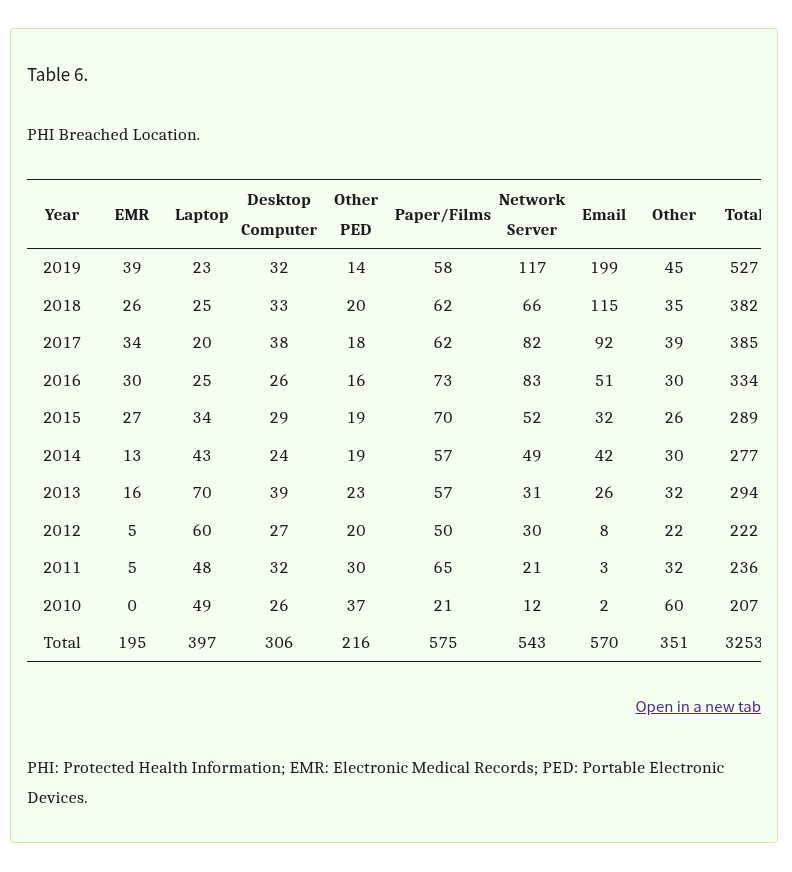 What makes these devices particularly risky is their mobility and the varying levels of security applied to them. A hospital desktop used by multiple employees on a rotating shift may be improperly locked or contain unencrypted data. A traveling nurse’s laptop might be lost during transit and never reported. A tablet used in home care visits may still have access to sensitive systems even after the provider has left the organization.
In many healthcare environments, especially those with distributed teams or multiple locations, keeping track of every single device is a logistical challenge. This often leads to poor endpoint management and, in some cases, complete failure to retrieve assets during employee transitions.
These devices are gateways to patient data, and without proper oversight, they can become unguarded entry points. Encryption helps, but only when used consistently and backed by strict access control policies. Devices can still be exploited if credentials are stored locally, if systems auto-login, or if the device itself isn’t locked down remotely after departure.
The result is a growing number of breaches that can be traced back to a very basic operational failure: not knowing where your hardware is or who still has access to it.
The Real Offboarding Problem: Incomplete IT Asset Recovery
Healthcare organizations are heavily regulated when it comes to managing PHI, but many still lack robust internal processes for IT asset recovery during offboarding. This is where technical debt and process gaps collide in dangerous ways.
When an employee leaves, whether due to resignation, retirement, termination, or contract expiration, HR may update records and revoke building access, but IT asset retrieval is frequently delayed or entirely overlooked. Without coordination between HR and IT, physical devices and digital access can remain active long after an employee is gone.
Offboarding failures can be especially common during times of rapid staffing changes, such as mergers, seasonal hires, or large-scale layoffs. Devices get reassigned without full data wiping, or they go missing entirely. In some cases, organizations don’t even know which employee was using a specific laptop or mobile device.
The shift toward hybrid and remote work has made this worse. Many healthcare professionals now work from home or in the field, and their assigned devices may never return to a central office. Without a system for tracking who has what, or a checklist that flags missing assets during offboarding, these devices fall into limbo.
That limbo is exactly where breaches begin. A lost laptop with stored credentials or cached data can easily become the source of a reportable PHI exposure, especially if no one realizes it’s missing until it’s too late.
Case Studies and Breach Examples Linked to Endpoints
Public breach records include numerous incidents showing how unreturned or insecure endpoint devices triggered major compliance challenges and financial fallout.
In one well‑documented case, a hospital executive left a work‑issued laptop in a locked car, and the vehicle was broken into. That laptop contained access to over 40,000 medical records and was not encrypted. The healthcare system spent more than $200,000 on remediation, monitoring, and security improvement efforts. (NIST)
Another example involves Coplin Health Systems, which suffered a breach affecting 43,000 patients after a laptop was stolen from an employee’s car. Though the device was password‑protected, the organization failed to encrypt the data on its hard drive. The lost data included names, Social Security numbers, addresses, medical data, and more. (Healthcare IT News)
In a different scenario, Truman Medical Centers reported that a work laptop containing patient data was stolen from an employee’s vehicle. That incident triggered a HIPAA report affecting more than 114,000 patients. (KCUR)
On the side of internal access failure, Upstate University Hospital experienced a prolonged exposure after a former employee retained access to patient records for nearly a year post‑departure. (Digital Guardian)
Another recent case: Geisinger announced that a former employee of one of its business associates unlawfully accessed protected health information for over 1.2 million patients. That breach stemmed from inadequate access controls and incomplete deprovisioning following employment termination. (The HIPAA Journal)
Additionally, in Colorado, a critical access hospital agreed to a $114,000 settlement with the Office for Civil Rights (OCR) after failing to terminate a former employee’s access to a hospital PHI database. (Bricker Graydon)
These cases illustrate two common patterns: (1) lost or stolen devices that were not encrypted or tracked properly, and (2) improper offboarding that allowed former users to retain access to sensitive systems. Either way, these failures lead to costly investigations, mandatory breach notifications, fines, reputational damage, and potential lawsuits.
What These Breaches Actually Cost
The consequences of endpoint-related breaches are more than regulatory. They affect financial stability, public trust, and internal morale. According to the 2023 IBM Cost of a Data Breach Report, the average healthcare breach cost reached over $10 million per incident. This includes direct costs like fines and legal fees, as well as indirect costs like patient churn and reputation damage.
When a lost or stolen device leads to a breach, organizations incur costs for breach response teams, forensic audits, legal consultations, and credit monitoring services for affected individuals. There are also long-term operational impacts. Staff have to spend time documenting the breach, answering patient concerns, and implementing new controls to prevent recurrence.
What’s more, the cost of a breach linked to a device that was supposed to be recovered during offboarding feels especially wasteful. These are avoidable incidents that stem from internal missteps, not outside attacks.
The financial fallout doesn’t stop at fines or response costs. Healthcare organizations may face class-action lawsuits from patients whose data was exposed. Insurers may raise premiums or refuse coverage. Contracts with other providers or government agencies could be lost due to non-compliance.
Why Your Offboarding Process Needs a Tech Refresh
If your current offboarding process focuses only on paperwork and badge collection, you’re leaving your organization exposed. A modern, effective offboarding strategy must be built around the secure and documented recovery of all IT assets.
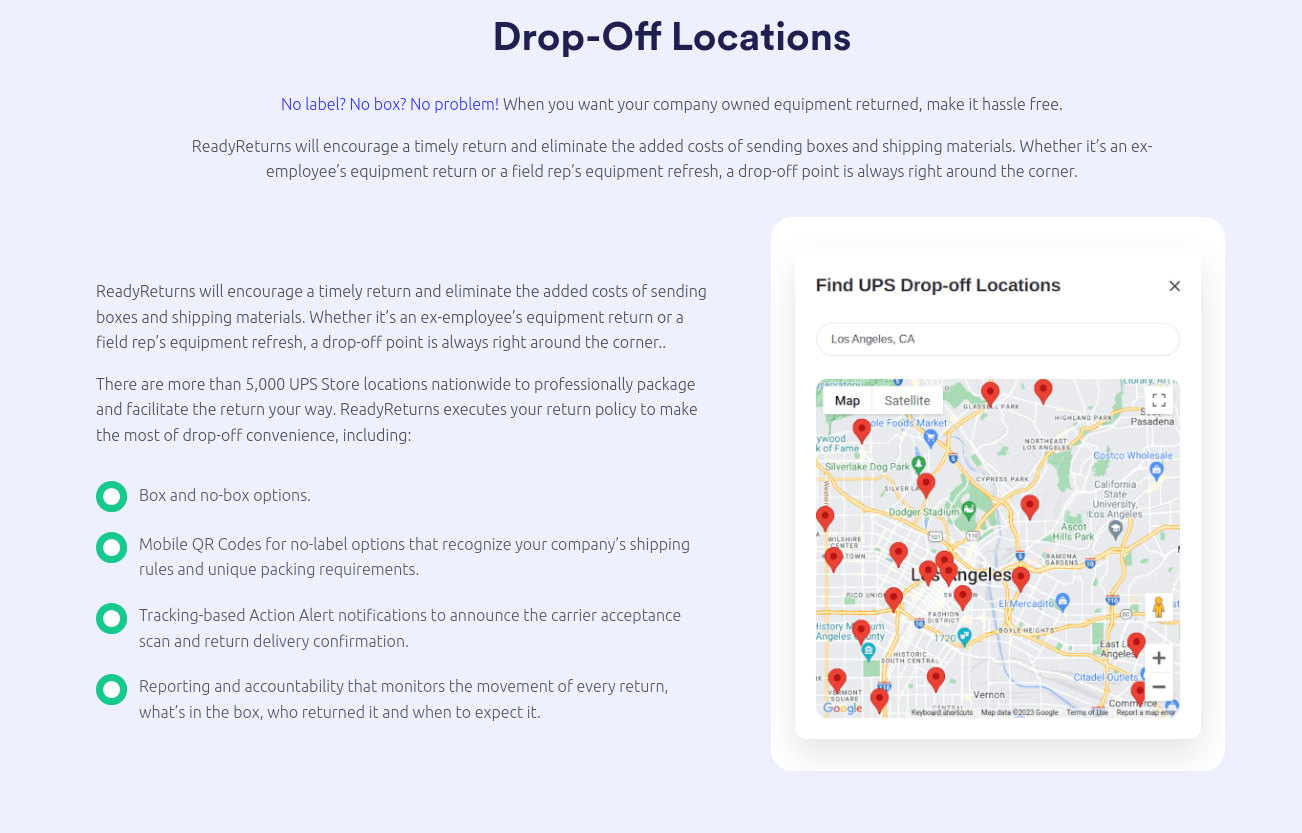
This starts with integrating HR and IT systems so that offboarding is a unified process. As soon as a termination is initiated, a signal should be sent to IT to begin asset recovery and access revocation. That includes tracking down laptops, tablets, mobile devices, access cards, and any credentials for internal systems or cloud platforms.
What’s more, these steps should be automated wherever possible. Using healthcare-focused IT asset management (ITAM) software, teams can create workflows that assign, monitor, and recover devices throughout the employee lifecycle. Alerts can be set for overdue assets, and audit trails ensure compliance with HIPAA and other regulatory requirements.
With the right tools, it’s easier to document that devices were retrieved, wiped, or remotely locked. This documentation becomes critical if a breach occurs and regulators ask for proof that appropriate measures were taken.
Key Features That Support Security and Compliance
The right healthcare asset management software will come with specific features designed to support compliance, safety, and productivity. Here are the most critical ones:
Automated Check-in/Check-out Tracking
Every time an asset is checked out, the system logs who took it and when. This data helps prevent loss and creates accountability.
Chain-of-Custody Logs
This audit trail becomes essential when dealing with security incidents or regulatory inspections. It shows a clear, unbroken record of every device’s movement and usage.
Secure Offboarding Tools
During employee offboarding, the software automatically flags all assigned equipment and tracks its return. This ensures nothing slips through the cracks.
Geo-location and Real-Time Monitoring
Administrators can view where critical assets are located at all times. Alerts can be configured for suspicious activity or if a device leaves a secure zone.
Alerts and Reporting Dashboards
Custom reports and automated alerts help staff stay ahead of asset loss, maintenance schedules, and overdue returns.
Each of these features helps close gaps that could otherwise lead to HIPAA violations or equipment loss.
A New Standard for IT Asset Retrieval in Healthcare
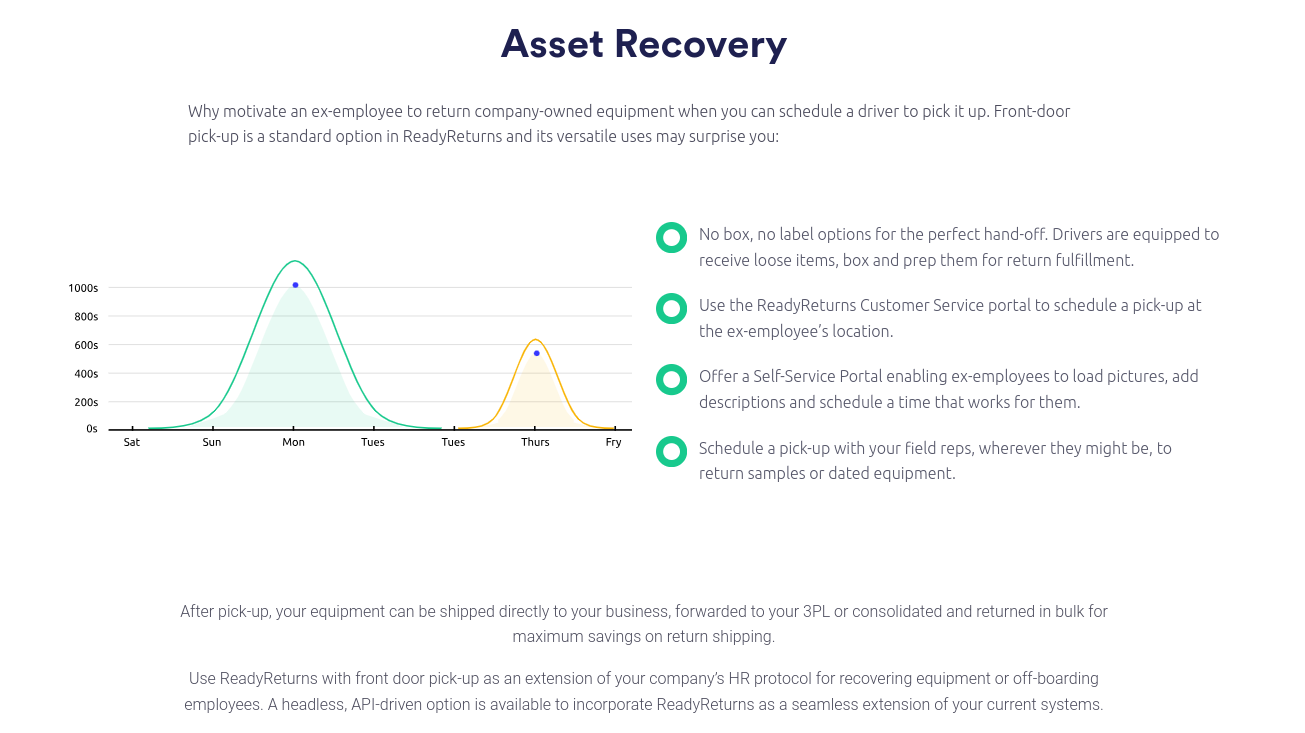
Healthcare organizations need to treat device recovery as a core security function, not an afterthought. Building a new standard for IT asset retrieval starts with knowing where every device is, who has access to it, and what data it holds.
Here are some best practices that every healthcare IT and HR department should follow:
- Maintain a centralized inventory of all IT assets and who they are assigned to
- Implement strict assignment and recovery policies for all employee-issued devices
- Use remote wipe and lock capabilities for all mobile and portable devices
- Require encryption on all endpoints and verify it regularly
- Conduct periodic audits to identify missing or unreturned hardware
- Automate offboarding workflows to trigger IT asset recovery at the right time
- Ensure documentation is stored for every returned, reassigned, or decommissioned device
These practices aren’t just about compliance. They’re about reducing risk, saving money, and building trust with patients who expect their data to be handled with care.
CIt’s Not Just About the Data, It’s About the People
Protecting PHI isn’t only about systems and software. It’s about the patients behind the data. When a healthcare provider loses control over its endpoint devices, it risks more than just regulatory penalties. It risks losing the confidence of the people it serves.
The weakest link in the healthcare data chain is often the simplest one. An unreturned laptop, a forgotten desktop, or a shared device without clear ownership. These are avoidable gaps, and they should be treated with the urgency they deserve.
Healthcare organizations must recognize that offboarding is a critical moment for data security. With the right processes and tools, these risks can be reduced significantly. Every untracked device is a breach waiting to happen. Now is the time to close those gaps for good.
Is Your Offboarding Process Breach-Proof?
If your organization is relying on manual spreadsheets or disconnected systems to track assets during offboarding, it’s time for a change. Missing devices aren’t just lost inventory. They are compliance liabilities.
Explore how ReadyCloud can help your healthcare organization improve IT asset recovery, automate offboarding workflows, and reduce the risk of PHI data loss.
Schedule a personalized demo or talk to a specialist today to see how you can protect your data at the endpoint level before it’s too late.
FAQs About Healthcare Data Breaches
What is the most common cause of healthcare data breaches?
Hacking and unauthorized access are among the most common causes, but theft and loss of devices—especially laptops and desktops—also represent a significant percentage.
How do end-user devices contribute to healthcare breaches?
They often store or access sensitive data, and when lost, stolen, or left unmonitored during offboarding, they can expose PHI to unauthorized users.
What is the average cost of a healthcare data breach?
Recent reports show the average cost exceeds $10 million per breach, making healthcare the most expensive industry for data loss.
Does HIPAA require encryption of all endpoint devices?
Encryption is not mandated but is strongly recommended. Unencrypted devices that are lost or stolen usually trigger breach notification requirements.
Can a lost encrypted laptop still be considered a data breach?
Yes, if the organization can’t prove the encryption meets federal standards or if credentials were stored insecurely on the device.
How should healthcare organizations handle IT asset recovery during offboarding?
They should follow a documented, automated process that includes tracking, recovering, and verifying the status of all IT assets issued to employees.
What are examples of devices that commonly go unaccounted for in healthcare?
Laptops, smartphones, USB drives, tablets, and desktops located in offsite or remote locations are commonly missed.
How can ReadyCloud help reduce endpoint-related healthcare breaches?
ReadyCloud offers healthcare-focused tools for asset tracking, offboarding automation, and compliance documentation that help close the gaps that lead to data loss.
What steps can smaller clinics take if they can’t afford enterprise-level solutions?
They can start with policy enforcement, use encryption, maintain detailed checklists, and adopt scalable IT asset tracking solutions that fit their budget.
Ready to See What Better Protection Looks Like?
Don’t wait for the next breach headline to hit too close to home. Healthcare asset management software is more than a safeguard—it’s a necessity in 2025. If you’re ready for smarter compliance, real-time insights, and security that works behind the scenes, it’s time to act. See how ReadyCloud’s healthcare asset management solutions can help you stay HIPAA-compliant and ahead of cyber threats today.